Who this guide is for
🧑💻 Are you a JupyterHub user who wants a quick tour of the usage quota system? See the quickstart guide for Users.
🔧 Are you a JupyterHub admin who wants to quickly understand how to deploy the usage quota system? See the quickstart guide for Admins.
Users
Background
Usage quotas are an effective safeguard against excessive resource consumption and spiralling costs, especially in a cloud computing environment. They can be applied to resources such as:
Usage Quota Dashboard
You can view any usage quotas applied to your account with the Usage Quota Dashboard.
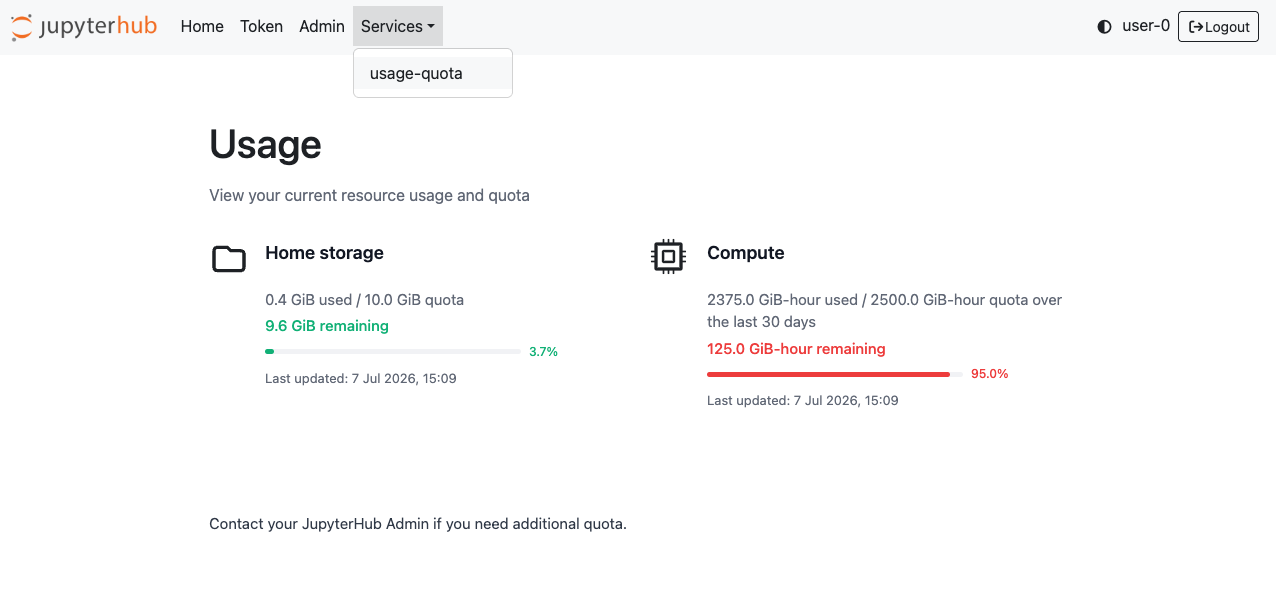
Home storage
When you have run out of home storage, you may be unable to launch your server session the next time. If this happens, contact your JupyterHub admin for help with deleting stale data.
Compute
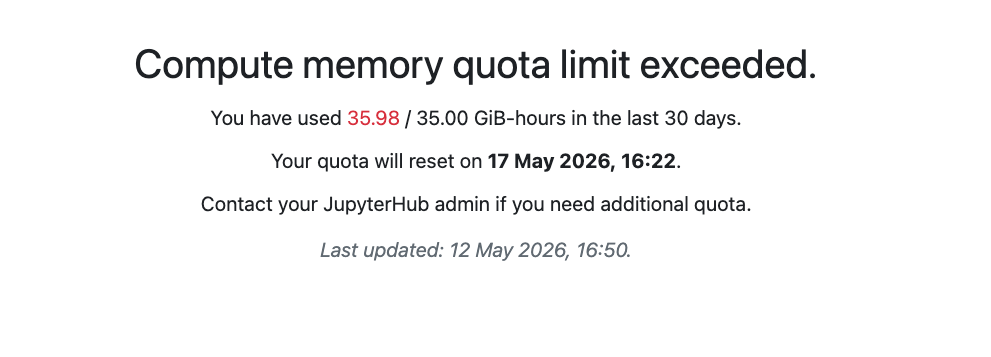
When you have run out of compute quota, your server launch will be denied the next time you try. The compute quota system operates on a rolling window, so your usage expires at a continual rate (rather than a hard reset e.g. at the beginning of the month). A retry time will be displayed when you try to launch a server showing you when compute quota is available to you again. If you require more compute quota, contact your JupyterHub admin for help.
Admins
Prerequisites
This quickstart guide assumes that the reader is running a Zero to JupyterHub deployment with a Prometheus instance scraping metrics fromkube-state-metrics and optionally jupyterhub-home-nfs for home storage quotas (see Explanation - Overview), and has some knowledge of
Building images
Installing JupyterHub with jupyterhub-usage-quotas
Create custom Hub image with jupyterhub
-usage -quotas installed. See Services — Zero to JupyterHub with Kubernetes documentation for details on how to do this. Make sure you list all of the dependencies you require for the Hub image, e.g. in a
requirements.txtfileSee the example below
Build and push your custom Hub image to a registry and make a note of the image tag.
Minimal z2jh configuration example
Authentication
Usage quota policies are applied to user groups, therefore this information needs to be available in a user’s auth_state. This minimal working example assumes a z2jh deployment that uses OAuthenticator to handle authentication, specifically the Generic OAuthenticator. Make sure that you set the appropriate configuration for your authenticator in addition to the minimal example below. See User Group Management for more details.
Home Storage Quotas
If you are using home storage quotas, then make sure that you set the appropriate configuration for jupyterhub-home-nfs in addition to the minimal example below.
Configuration setup helper function
The jupyterhub-usage-quotas library is composed of two main modules:
The manager that enforces compute quotas at server launch time
The service that runs the user-facing usage quota dashboard.
A helper function to setup the system for JupyterHub should be set with:
hub:
  extraConfig:
    01-setup-usage-quotas: |
        from jupyterhub_usage_quotas import setup_usage_quotas
        setup_usage_quotas(c)
Required configuration
The following items are required configuration:
c.UsageQuotaManager.metrics_exporter_token = os.environ.get("METRICS_EXPORTER_TOKEN")(remember toimport oswithin theextraFilesconfig file)c.UsageViewer.public_hub_url: the public URL of the JupyterHub on the web
Common configuration
Configuration common to both manager and server modules need to be defined individually, which introduces some duplication. Common configurations include:
c.Usage[QuotaManager|Viewer].prometheus_url: the server url of the Prometheus instance that is used as a source of truth for usage datac.Usage[QuotaManager|Viewer].hub_namespace: the Kubernetes namespace where the Hub pod is running
Mounting configuration files
You can mount configuration under extraFiles so that they can be referenced by both modules and loaded in addition to the setup function in hub.extraConfig.
Secrets Management
The usage quota system relies on configuring sensitive secrets, such as session keys and credentials, including:
c.Usage[QuotaManager|Viewer].prometheus_auth: credentials for the Prometheus serverc.UsageViewer.secret_session_key: maintain a secure session with the usage quotas dashboard without needing to log in again.
You can also mount this secret configuration under extraFiles so that they can be referenced by both modules.
The hub API token for the metrics exporter service can be passed with:
hub:
  extraEnv:
    METRICS_EXPORTER_TOKEN:
      valueFrom:
        secretKeyRef:
          name: hub
          key: hub.services.metrics-exporter.apiToken
          optional: false
Minimal Example
# config.yaml

hub:
  image:
    name: myregistry/my-custom-hub-image
    tag: <image-tag>
  config:
    JupyterHub:
      authenticator_class: generic-oauth
    GenericOAuthenticator:
      allowed_scopes:
        - group-0
      auth_state_groups_key: scope
      enable_auth_state: true
      manage_groups: true
      scope:
        - group-0
    UsageQuotaManager:
      scope_fallback_strategy:
        intersection: min
      policy:
        - resource: memory
          limit: '1000G'
          window: 7
          scope:
            group:
              - group-0
      failover_open: false
    extraConfig:
      01-setup-usage-quotas: |
        from jupyterhub_usage_quotas import setup_usage_quotas
        setup_usage_quotas(c)
    extraFiles:
      usage_quota_config:
        mountPath: /usr/local/etc/jupyterhub/jupyterhub_config.d/jupyterhub_usage_quota_config.py
        stringData: |
          import os
          c.UsageQuotaManager.metrics_exporter_token = os.environ.get("METRICS_EXPORTER_TOKEN")
          c.UsageViewer.public_hub_url = "https://<public-hub-url>"
          c.UsageQuotaManager.prometheus_url: "http://<prometheus-service-name>.<k8s-prometheus-namespace>.svc.cluster.local"
          c.UsageViewer.prometheus_url: "http://<prometheus-service-name>.<k8s-prometheus-namespace>.svc.cluster.local"
          c.UsageQuotaManager.hub_namespace: "<k8s-hub-namespace>"
          c.UsageQuotaViewer.hub_namespace: "<k8s-hub-namespace>"
    extraEnv:
      METRICS_EXPORTER_TOKEN:
        valueFrom:
          secretKeyRef:
            name: hub
            key: hub.services.metrics-exporter.apiToken
            optional: false
  services:
    usage-quota:
      url: http://hub:9000
      display: true
      oauth_no_confirm: true
      command:
        - python3
        - -m
        - jupyterhub_usage_quotas.services.usage_viewer
        - --config-files=/usr/local/etc/jupyterhub/jupyterhub_config.d/jupyterhub_usage_quota_config.py
        - --config-files=/usr/local/etc/jupyterhub/jupyterhub_config.d/jupyterhub_usage_quota_config_secret.py
    metrics-exporter:
      display: false
  loadRoles:
    usage-quota-service:
      scopes:
        - read:users
      services:
        - usage-quota
    user:
      scopes:
        - self
        - access:services!service=usage-quota
    metrics-exporter-service:
      scopes:
      - users
      services:
      - metrics-exporter
    networkPolicy:
      ingress:
        - ports:
            - port: 9000
          from:
            # Allow traffic from the proxy api pod
            - podSelector:
                matchLabels:
                  hub.jupyter.org/network-access-hub: "true"
            # Allow traffic from the hub pod itself for Jupyterhub's internal healthchecks for hub managed services.
            - podSelector:
                matchLabels:
                  app.kubernetes.io/component: hub
                  app.kubernetes.io/name: jupyterhub
        - ports:
          - port: 8081
          from:
          # Allow traffic from the hub pod itself for oauth calls from the usage-quota service to the hub api.
          - podSelector:
              matchLabels:
                app.kubernetes.io/component: hub
                app.kubernetes.io/name: jupyterhub
    service:
      extraPorts:
        - port: 9000
          targetPort: 9000
          name: usage-quota
  # The proxy.chp.networkPolicy.egress configuration below is required for the usage-quota dashboard service to be accessible for users.
  proxy:
    chp:
      networkPolicy:
        egress:
          - to:
              - podSelector:
                  matchLabels:
                    app.kubernetes.io/name: jupyterhub
                    app.kubernetes.io/component: hub
            ports:
              - port: 9000
# enc-config.yaml
# Note: this contains secrets so make sure you encrypt this file if using a version control system
hub:
extraFiles:
usage_quota_config_secret:
mountPath: /usr/local/etc/jupyterhub/jupyterhub_config.d/jupyterhub_usage_quota_config_secret.py
stringData: |
c.UsageQuotaManager.prometheus_auth = {
"username": "<prometheus_username>",
"password": "<prometheus_password>"
}
c.UsageViewer.prometheus_auth = {
"username": "<prometheus_username>",
"password": "<prometheus_password>"
}
c.UsageViewer.session_secret_key = "<use-a-secure-key-in-production>"See Configuration for a full list of configuration options.